
When you subscribe a /30 (2 address) or /29 (6 address), by default PPPoE Client only provide one IP for Router Gateway. So, remaining address need to routed so your server, service can use dedicated IP address.
In this guide, I’ll use 202.118.0.1 as example and using default configuration defconf
Step is pretty easy! Let’s Begin
Router Internet
Make sure you have working basic internet and pppoe-out1 is up and running… So your Mikrotik Addresses and Route has default entry.
Handout /30
The /30 (255.255.255.252) only have two available IP Address, but first IP Address is used by the Router as Route Gateway and cannot use for other purpose!
IP ➡️ Address List
| Flag | Address | Network | Interface |
| D | 202.118.0.1 | 1.9.88.254 | pppoe-out1 |
| 202.118.0.1 | 202.118.0.2 | ether1 |
Handout /29
The /29 (255.255.255.248) only have six available IP Address, but first IP Address is used by the Router as Route Gateway and cannot use for other purpose!
IP ➡️ Address List
| Flag | Address | Network | Interface |
| D | 202.118.0.1 | 1.9.88.254 | pppoe-out1 |
| 202.118.0.1 | 202.118.0.2 | ether1 | |
| 202.118.0.1 | 202.118.0.3 | ether2 | |
| 202.118.0.1 | 202.118.0.4 | ether3 | |
| 202.118.0.1 | 202.118.0.5 | ether4 | |
| 202.118.0.1 | 202.118.0.6 | ether5 |
if you have larger address, can be simplified like this:
| Flag | Address | Network | Interface |
| D | 202.118.0.1 | 1.9.88.254 | pppoe-out1 |
| 202.118.0.1/29 | 202.118.0.0 | bridge1 |
assume your bridge1 is your new bridge contain others interface
Firewall
By default, forward traffic is block, you need to accept the forwarding
IP ➡️ Firewall ➡️ NAT
/ip firewall nat add action=accept chain=srcnat comment="routed pppoe" src-address=202.118.0.1/30 place-before=0If you have /29 or /28 or even /24, please change it to your size
IP ➡️ Firewall ➡️ Filter
/ip firewall filter add action=accept chain=forward comment="routed pppoe" dst-address=202.118.0.2 place-before=1

/ip firewall filter add action=accept chain=forward comment="routed pppoe" src-address=202.118.0.2 place-before=2
If you have large address like /29, it’s best practice to use Address List to exclude first IP address being exposed:
/ip firewall address-list add address=202.118.0.2 list=wan_ip
/ip firewall address-list add address=202.118.0.3 list=wan_ip
/ip firewall address-list add address=202.118.0.4 list=wan_ip
/ip firewall address-list add address=202.118.0.5 list=wan_ip
/ip firewall address-list add address=202.118.0.6 list=wan_ip
Then use -list to forward everything
/ip firewall filter add action=accept chain=forward comment="routed pppoe" dst-address-list=wan_ip place-before=1

/ip firewall filter add action=accept chain=forward comment="routed pppoe" src-address-list=wan_ip place-before=2
Server IP Address!
After all done adjusting Address and Firewall, now you can set WAN IP like this!
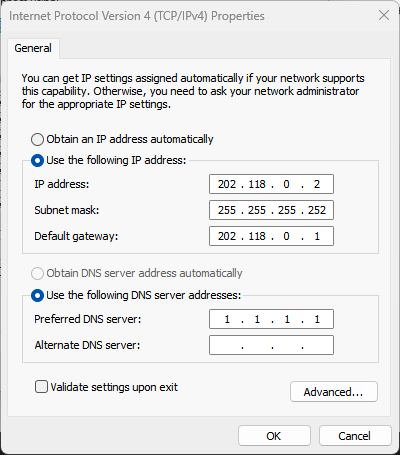
The Default Gateway is your router WAN IP Address!
That’s it!